
The May 11, 2026 deadline for Salesforce’s new Connected App security controls has come and gone. A lot of integrations made it through cleanly. Plenty didn’t, and the teams behind them are still working through edge cases, customer re-authorizations, and post-mortem questions about why something that looked like a configuration toggle ended up being a distributed systems problem.
I’ve been building integrations against Salesforce for years, and refresh token rotation is the kind of change that quietly rearranges your assumptions about background jobs, queues, and shared state. If you’re cleaning up after the migration, or you missed the deadline and are still scrambling, or you’re maintaining an integration that scraped through but feels fragile, this is a practitioner’s view of the four controls and the implementation patterns that hold up under load.
What’s actually being enforced
Four security controls are now mandatory for any Connected App or External Client App (ECA) that’s authorized to more than two customer production orgs:
- OAuth PKCE (Proof Key for Code Exchange)
- OAuth Refresh Token Rotation (RTR)
- Refresh Token Idle TTL (30-day sliding window)
- Refresh Token IP Allowlist
A couple of clarifications worth getting straight, because they come up constantly.
The two-org threshold is the tripwire. One production org, you’re out of scope. Two or more, you’re in. Sandbox and developer orgs don’t count toward the threshold.
PKCE applies to flows that use an authorization code, such as the Web Server flow and the Hybrid Web Server flow. It doesn’t apply to JWT Bearer or Client Credentials flows because those don’t involve an authorization code exchange. User Agent flow is also out of scope for the PKCE control, though it’s worth saying that User Agent flow isn’t allowed for AppExchange use cases regardless.
The IP allowlist control has exemptions. Mobile apps with custom URI scheme callbacks (like sfdc://success) aren’t required to enforce it, because end-user devices don’t have static IPs. Salesforce-to-Salesforce refresh token flows are also exempt.
If you mix flows in a single Connected App, say a mobile app and a web server flow sharing the same CA, Salesforce enforces the IP allowlist if any web server flow is present, regardless of the mobile use case. The right move is to split them into separate apps.
Why Salesforce refresh token rotation is harder than it looks
The security rationale is fine. If a refresh token leaks, rotation limits how long it remains useful. On every refresh, Salesforce issues a brand new refresh token and invalidates the old one.
The hard part is concurrency. Any background worker architecture making API calls to a single Salesforce org has a coordination problem the moment rotation is enabled.
Picture two workers waking up at the same time holding an expired access token. Both try to refresh, both using the same refresh token. The first request succeeds and gets back a new access token plus a new refresh token. The old one is now dead. The second request comes back with invalid_grant, because the token it presented is no longer valid. Most teams catch this in testing.
The second failure mode is the one that catches people out. If a stale refresh token is used after rotation has already happened, Salesforce treats it as a potential replay or compromise signal and revokes the entire token chain. Including the new tokens. Recovery is a customer re-authorization through the OAuth flow. There is no programmatic way back.
So making stale-token use rare isn’t sufficient. You need to make it impossible.
A Salesforce refresh token rotation coordination pattern
For any background job architecture talking to Salesforce, the pattern that holds up under load is a distributed lock, scoped per org, around the refresh operation. A few details matter more than they sound like they should.
Use a real distributed lock. Your framework’s cache abstraction is not one, no matter what’s backing it. Rails.cache, Django’s cache framework, and similar layers have enough serialization and middleware overhead that on a hot path measured in milliseconds, two workers can both believe they hold the lock simultaneously. Go directly to your lock primitive. Redis SET NX PX works. So does a library like Redlock if you want something with built-in lifecycle handling.
Scope the lock per org_id. A global lock serializes unrelated customers and creates a latency problem you didn’t have before.
Apply double-checked locking inside the critical section. After acquiring the lock, re-read the token from your shared cache. If another worker just refreshed it, you’re done, just use that and release the lock. This collapses the thundering herd. Only the first worker through ends up calling Salesforce.
def with_fresh_access_token(org_id):
    token = read_token_from_redis(org_id)
    if token and not near_expiry(token):
        return token

    with distributed_lock(f"sf_token_refresh:{org_id}", ttl=10_000):
        # Double-check: another worker may have refreshed while we waited
        token = read_token_from_redis(org_id)
        if token and not near_expiry(token):
            return token

        new_token = refresh_token_via_salesforce()
        persist_to_durable_storage(new_token)   # save before using
        write_token_to_redis(org_id, new_token)
return new_tokenA few notes on the details.
Lock TTL should be longer than the worst case Salesforce token endpoint response time, which can spike to several seconds under load, but short enough that a crashed worker doesn’t block the org indefinitely. Ten to fifteen seconds is a reasonable starting point. Tune from there.
Persist the new refresh token to durable storage before you make any API call with the new access token. If a worker dies between using the access token and saving the new refresh token, the org is unrecoverable. Save first, then use. This sounds obvious. It is also the most commonly-missed ordering constraint I’ve seen.
Refresh proactively when you can. If a token is about 80% through its lifetime, refresh it during a quiet moment rather than waiting for a 401 under load. Add a small random jitter so that multiple workers don’t all decide to refresh at the same instant.
Implementing PKCE
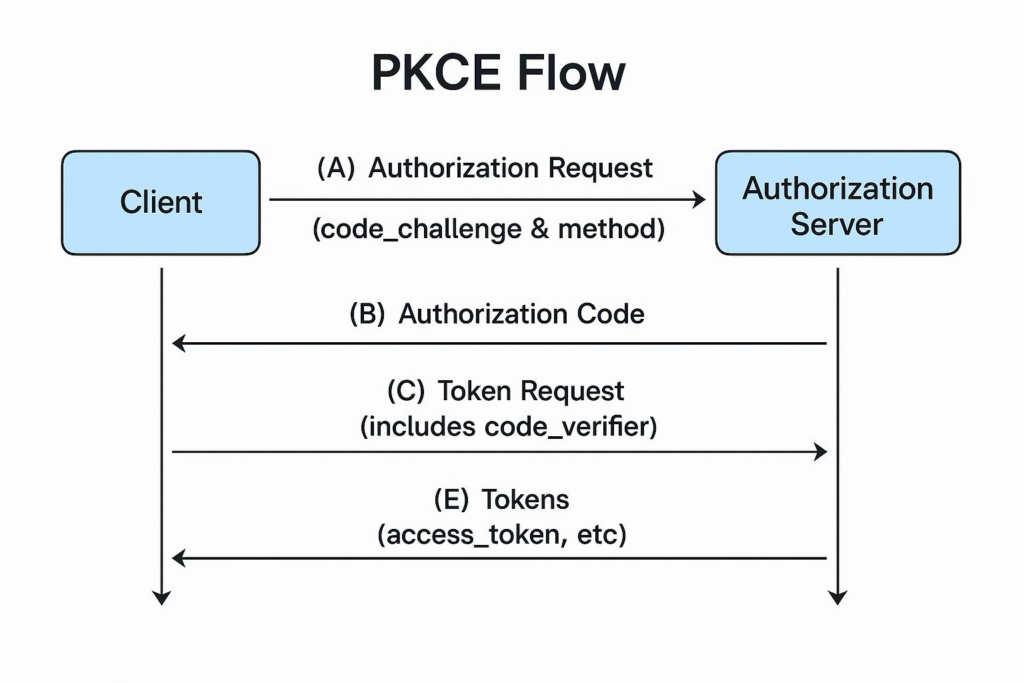
PKCE is the simpler control. The useful operational detail buried in the Salesforce guidance is that you can deploy your PKCE code changes before enabling the control on the Connected App. Salesforce ignores the code_verifier until PKCE is enabled in app configuration, so you can sequence the rollout safely. Ship the code, verify nothing broke, then flip the toggle. Useful if you’re still rolling this out to a fleet of apps.
Idle TTL and offline use cases
Refresh Token Idle TTL invalidates a refresh token if it hasn’t been used in a 30-day window. It’s a sliding window, not a fixed expiry. Every refresh resets the clock.
For server to server integrations running continuously, this is a non-issue. For mobile apps where a user might legitimately not open the app for a month, it’s a design problem that some teams are only now hitting, because the first 30-day window since enabling the control is just starting to expire for the oldest tokens.
The cleanest pattern, if your architecture allows it, is a server side proxy that holds the refresh token and keeps it warm with periodic refreshes every few days. When the mobile app reconnects, it pulls the latest token from the server. The token stays alive regardless of device activity.
If your architecture is purely client side, you need to handle the invalid_grant response without destroying local state. Logging users out and wiping locally stored offline data because a refresh token went idle is a real UX problem, and it deserves thinking through properly rather than patching in production.
The 256 IP limit
The Refresh Token IP Allowlist is capped at 256 total IP addresses across all configured ranges. This is a hard limit. There is no extension process and no plans to change it.
For anyone running on AWS, Heroku, or any cloud platform with dynamic egress IPs, fitting inside 256 addresses is not trivial. The expected solution is an egress proxy: route your Salesforce refresh token requests through a small number of static IPs you control, and allowlist those.
On a VPC, that typically means a NAT gateway with an Elastic IP, or a small outbound proxy fleet. On Heroku, it usually means something like QuotaGuard or a similar fixed IP proxy add-on. Your application servers don’t need static IPs. Only the egress path for refresh token calls does.
The control doesn’t apply to mobile apps using custom URI schemes, and it doesn’t apply to Salesforce to Salesforce refresh flows. So this is mostly a concern for server side ISV integrations.
Testing Salesforce refresh token rotation safely
If you got through May 11 and now need to refine your implementation (tighten the lock, add proactive refresh, restructure your apps), the Salesforce-recommended pattern still applies: create a separate ECA in a sandbox or test org and validate changes there without touching the live Connected App.
For RTR, validate the persist-and-rotate logic under concurrent load before changing anything in production. The word “concurrent” is doing a lot of work in that sentence. A single threaded happy path test will pass and tell you nothing about how production behaves when 50 workers wake up at once. Spin up real concurrency in sandbox. Run it for a while. Watch the logs.
One thing worth flagging if you haven’t done it yet: the “Review Controls” banner in your Connected App configuration is what permanently locks the four controls in place, and Salesforce has been asking in-scope ISVs to self-attest by using it. Locking is irreversible. Once you confirm, the controls cannot be turned off. Make sure everything is working before you click.
What customers are still seeing
Even with the partner side configured correctly, customers continue to see behavior changes that trace back to the rollout.
Refresh tokens issued before idle TTL was enabled are subject to the 30-day window starting from when you turned the control on. The first wave of those tokens is expiring now. Users who haven’t been active in the past month are getting bounced back through OAuth, and from the customer’s perspective this can look like a regression even though it’s working as designed.
If your OAuth logic lives inside managed package Apex code rather than in an external server-side system, customers need to upgrade to a new package version. This is the one scenario where a package upgrade is genuinely required for the security controls to take effect. If you haven’t shipped that version yet, or if customers haven’t upgraded, the controls aren’t actually enforced for them, and that’s a compliance gap worth closing.
Mobile apps distributed through App Store or Play Store are the long tail. You don’t control when end users update. If a user is on a build that predates your RTR-aware client code, they’ll get logged out repeatedly until they update. Customer support tickets for this scenario are still coming in for many ISVs, and the right answer is usually a coordinated update push plus clear in-app messaging.
Salesforce refresh token rotation implementation checklist
Whether you’re still cleaning up or just want to make sure nothing’s quietly broken, there’s a short checklist worth running through.
Confirm invalid_grant is handled distinctly from other errors. Retrying it is pointless. The only correct response is to route the user back through OAuth re-authorization. Conflating transient network errors with dead refresh tokens means you’ll either hammer Salesforce with doomed retries or lose users on a passing network blip.
Confirm refresh token storage is transactional with token use. The window between “got new refresh token from Salesforce” and “saved new refresh token to durable storage” is the most dangerous part of the whole flow. Save first, then use. If this isn’t bulletproof in your code, every refresh is rolling the dice on whether a crash takes the org down.
Make sure logs capture enough to debug rotation issues without logging the tokens themselves. Worker ID, org ID, timestamp, response code. Not the refresh token. You don’t want it in your log aggregator and you definitely don’t want it in error reports.
Audit every code path that loads a refresh token. Anywhere two processes could touch the same token concurrently is a hazard with rotation on. Make a list. Walk through each one. The ones that bite are usually the paths nobody thought of: a one-off rake task, a webhook handler, a retry queue that holds tokens in memory for longer than expected.
Where to look for current guidance
The authoritative source is the Salesforce ISV Force Guide page on Connected App and ECA security controls. The PartnerBlazer Slack channel is where most of the real time clarifications happen. Your Partner Account Manager is the right contact for anything that needs an exception, an extension discussion, or follow-up on a customer escalation tied to the migration.
Salesforce has said it will identify non-compliant ISVs and enforce the controls on their behalf, which means broken customer integrations for anyone who hasn’t migrated. If you’re reading this and you know you’re not yet compliant, the priority isn’t perfect, it’s getting the controls turned on with the coordination logic in place to survive them. The patterns above are a starting point.