
The way developers interact with Salesforce is changing. AI-assisted development, agent workflows, and programmatic automation are now central to how we build. However, the browser-first model of Salesforce administration creates friction. Scripting a browser is difficult, and an AI agent cannot use a mouse.
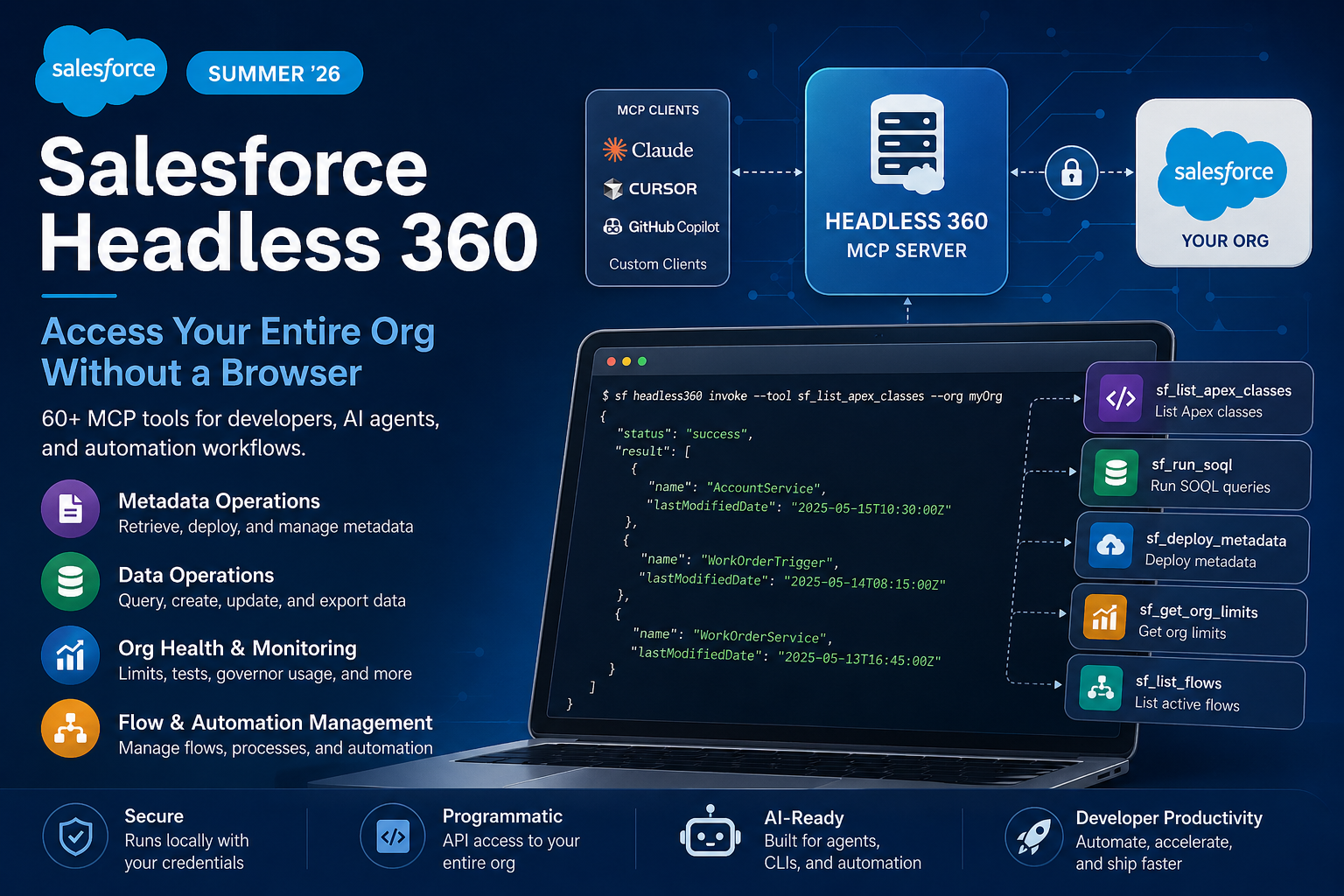
Salesforce Summer ’26 addresses this directly with Headless 360. This new platform exposes over 60 Salesforce operations as Model Context Protocol (MCP) tools. These tools can be used by any MCP-compatible client, including AI coding assistants, CLI pipelines, and custom automation scripts. There is no need for a browser or UI clicks—just a clean, documented API surface for everything from reading metadata to deploying flows.
This is one of the most forward-looking developer features in the Summer ’26 release. It clearly signals where Salesforce sees the developer experience heading.
What Is Salesforce Headless 360?
Headless 360 is a locally-running MCP server that authenticates to your Salesforce org and exposes platform capabilities as MCP tools. Any MCP-compatible client — Claude, Cursor, GitHub Copilot, or your own agent — can invoke these tools to interact with your org programmatically.
The “360” in the name reflects the breadth of coverage: metadata, data, deployment, configuration, testing, and monitoring are all represented.
Setting Up Salesforce Headless 360
Installation
# Install via npm
npm install -g @salesforce/headless360

# Or via Salesforce CLI plugin
sf plugins install @salesforce/headless360Starting the MCP Server
# Start the server connected to an authenticated org
sf headless360 start --target-org myOrg --port 3000The server starts locally and exposes an MCP endpoint at http://localhost:3000/mcp. Any MCP client can connect to this endpoint.
Connecting Claude or Another MCP Client
In your Claude Desktop claude_desktop_config.json:
{
  "mcpServers": {
    "salesforce": {
      "url": "http://localhost:3000/mcp",
      "transport": "http"
    }
  }
}Once connected, the AI assistant can use any of the 60+ registered tools directly in its tool calls.
What Can You Do With the 60+ MCP Tools?
Metadata Operations
// Ask your AI assistant:
"List all Apex classes modified in the last 7 days"
"Show me the full content of the AccountService class"
"Deploy the changes from my local project to the org"
"Retrieve the current WorkOrder trigger as source metadata"Under the hood, the AI calls tools like sf_list_apex_classes, sf_get_apex_class, sf_deploy_metadata, and sf_retrieve_metadata — all backed by the Metadata API and Tooling API.
Data Operations
// Your AI assistant can:
"Run this SOQL query and show me the results"
"Create a test Account record with these field values"
"Find all Contacts missing an email address"
"Export the last 100 Work Orders to CSV"Tools like sf_run_soql, sf_create_record, sf_update_record, and sf_export_data cover the full data plane.
Org Health and Monitoring
# Invoke directly via CLI for scripting
sf headless360 invoke --tool sf_get_org_limits --org myOrg
sf headless360 invoke --tool sf_list_failing_tests --org myOrg
sf headless360 invoke --tool sf_get_governor_usage --org myOrgOutput is always JSON, making it trivial to pipe into monitoring dashboards or CI/CD status checks:
sf headless360 invoke --tool sf_get_org_limits --org production | \
jq '.apiRequests | {used: .used, remaining: (.max - .used), pct: (.used / .max * 100)}'Flow and Automation Management
// AI-driven flow management:
"List all active Flows on the WorkOrder object"
"Show me which Flows have been modified this week"
"Deactivate the flow named 'Legacy_Case_Assignment'"
"Generate a summary of what the 'Work_Order_Routing' flow does"Real-World Use Cases
1. AI-Powered Org Audits
Connect an AI assistant to Headless 360 and ask it to audit your org: find all Apex classes with no test coverage, list flows with no description, and identify custom fields that have never been populated. Tasks that used to take a developer half a day of clicking through Setup are now completed in minutes with a natural language prompt.
2. CI/CD Pipelines Without Browser Dependencies
Many CI/CD automation gaps exist because some Salesforce operations require a browser session. With Headless 360, your pipeline scripts can perform org health checks, validate metadata state, trigger test runs, and parse results — all programmatically, without any browser or Selenium dependency.
#!/bin/bash
# Pre-deployment health check
LIMITS=$(sf headless360 invoke --tool sf_get_org_limits --org staging)
API_USAGE=$(echo $LIMITS | jq '.apiRequests.used / .apiRequests.max')

if (( $(echo "$API_USAGE > 0.85" | bc -l) )); then
  echo "WARNING: API usage above 85%. Delaying deployment."
  exit 1
fi

echo "Org health OK. Proceeding with deployment."
sf project deploy start --source-dir force-app --target-org staging --test-level RunRelevantTests3. Developer Assistant Workflows
For daily development, Headless 360 turns your AI coding assistant into a genuine Salesforce co-pilot. While you write Apex locally in VS Code, you can ask the assistant to simultaneously check the org’s current data model, validate that a field exists before you reference it, run a quick SOQL to test your query, and retrieve the current trigger content for comparison — without leaving your editor.
Best Practices and Caveats
Treat the MCP server like an authenticated API client. The server runs with the permissions of the authenticated user. Do not run it with a System Administrator profile in production without strict access controls on which clients can connect to the local port.
Keep it local by default. Headless 360 is designed to run on your development machine and connect to sandboxes or Developer Edition orgs. Running it against production should be deliberate, gated, and ideally limited to read-only tools.
Tool selection matters. When connecting an AI assistant, you can configure which tools are exposed. For an AI doing code review, expose only the read tools. For a deployment agent, expose the deployment tools. Do not expose everything by default.
Rate limits still apply. Headless 360 calls the same Salesforce APIs you would call manually. Bulk data exports, mass record operations, and frequent metadata retrievals all count against your org’s API limits.
Conclusion: Headless 360 Makes Salesforce a First-Class Programmatic Platform
Salesforce Headless 360 in Summer ’26 is a foundational shift in how developers and AI tools can interact with the platform. By exposing 60+ org operations as MCP tools, Salesforce is acknowledging that the future of development is agentic, programmatic, and browser-free.
If you are building AI-assisted workflows, investing in developer automation, or simply tired of the friction of browser-based Salesforce administration, Salesforce Headless 360 Summer ’26 is the feature to evaluate first. Set it up on your sandbox today and see how it fits into your team’s workflow.