
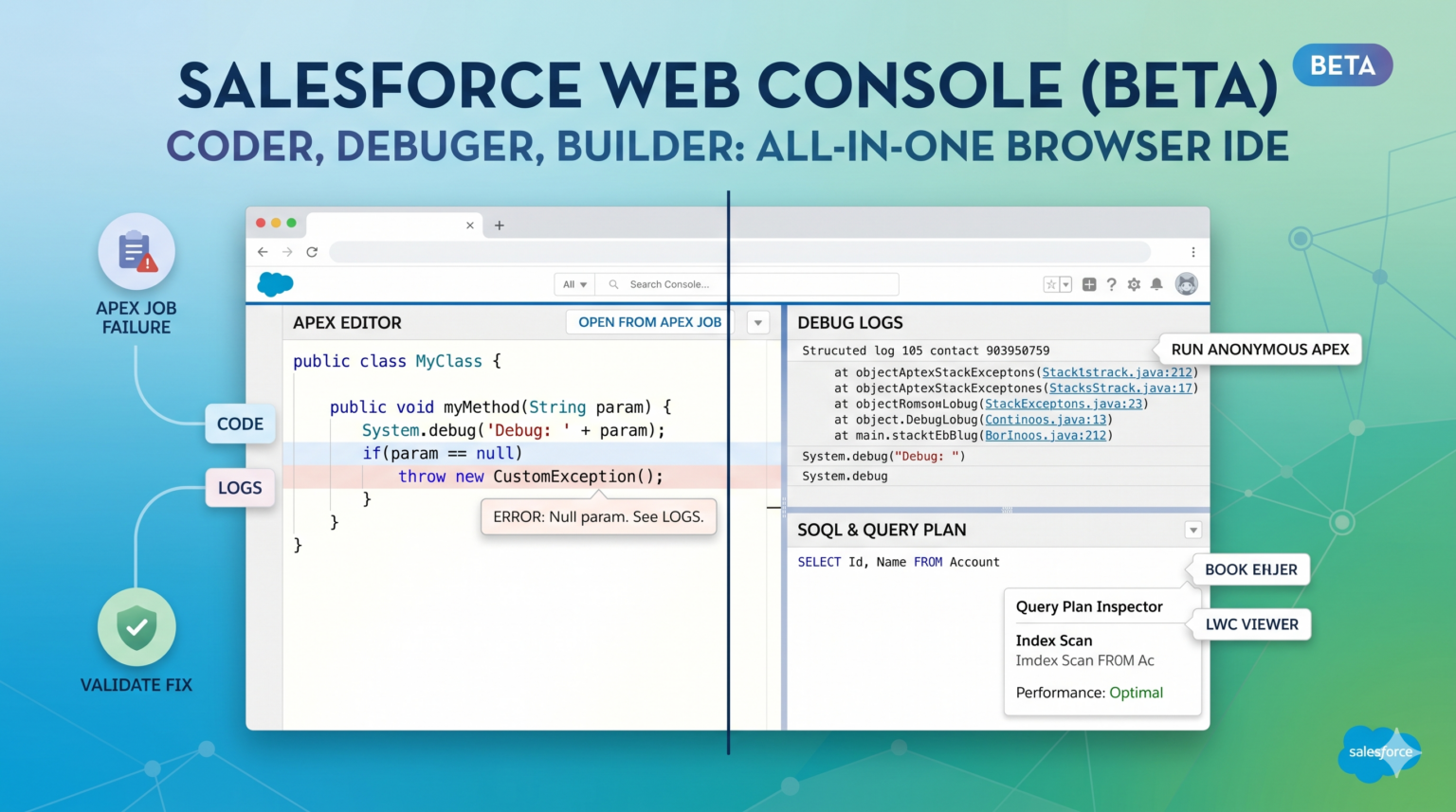
Let us be honest — the Salesforce Developer Console has not aged well. It was built for a different era of Salesforce development: no dark mode, no IntelliSense, sluggish on large orgs, and a debugging experience that would make any modern IDE user wince. For years, developers have been telling Salesforce this needed to change.
Salesforce Summer ’26 answers that call with Web Console Beta, a ground-up rebuild of the browser-based Salesforce IDE. It is faster, smarter, and designed for how Salesforce developers actually work in 2026 — with dark mode, real-time code intelligence, an improved log viewer, and a debugging experience that finally feels native rather than bolted on.
What Is Web Console?
Web Console is Salesforce’s new browser-based development environment, available directly from Setup without any installation. It is designed to cover the core development workflows that happen directly in the org — executing anonymous Apex, inspecting debug logs, browsing and editing metadata, running SOQL queries, and managing test runs — all from a modern, responsive UI.
It does not replace VS Code with the Salesforce Extension Pack for serious project-based development. Think of it as the upgrade to Developer Console for in-org, exploratory, and administrative development work.
What’s New in Web Console vs. Developer Console
Modern Editor with IntelliSense
Web Console’s Apex editor is built on the Monaco editor (the same engine powering VS Code). This means:
- Real-time IntelliSense — autocomplete for Apex classes, methods, SObject fields, and keywords as you type
- Inline error highlighting — syntax errors are flagged before you execute, not after
- Go to definition — Ctrl/Cmd+click to navigate to any class or method declaration
- Dark mode — finally
// Web Console autocomplete-friendly pattern
// Type "Account." and get the full field list inline
Account acc = [SELECT Id, Name, Industry, AnnualRevenue FROM Account LIMIT 1];
System.debug('Account: ' + acc.Name + ' | Revenue: ' + acc.AnnualRevenue);Redesigned Debug Log Viewer
The log viewer has been completely rebuilt. Instead of a wall of text with a basic filter, Web Console gives you:
- Structured log tree — logs are parsed and presented as a collapsible tree of events (DML, SOQL, Callouts, User Debug)
- Timeline view — visualise where time is being spent in an execution
- Inline SOQL results — SOQL statements in logs expand to show the actual records returned
- Persistent log history — logs are retained per-user across sessions, not cleared on page reload
// Execute this in Web Console's Execute Anonymous and watch the structured log
List<Contact> contacts = [SELECT Id, Name, AccountId FROM Contact WHERE AccountId != null LIMIT 50];
System.debug(LoggingLevel.INFO, 'Contacts found: ' + contacts.size());

for (Contact c : contacts) {
    System.debug(LoggingLevel.FINE, 'Processing: ' + c.Name);
}
In the new log viewer, the SOQL query appears as a collapsible node showing exactly which 50 records were returned — no more parsing raw log lines.
Improved SOQL Query Editor
The SOQL editor now includes:
- Schema-aware field picker — select an object, get all fields in a dropdown
- Relationship traversal — navigate parent and child relationships interactively
- Result export — export query results to CSV directly from the UI
- Query history — your recent queries are saved and searchable
SELECT
    Id,
    Name,
    Account.Name,
    Account.Industry,
    (SELECT Id, Subject, Status FROM Cases ORDER BY CreatedDate DESC LIMIT 3)
FROM Contact
WHERE Account.Industry = 'Technology'
    AND CreatedDate = LAST_N_DAYS:30
ORDER BY Name ASC
LIMIT 100
Integrated Test Runner
Web Console includes a test runner panel that is significantly more usable than Developer Console’s equivalent:
- Run all tests, a class, or a specific method
- See pass/fail per method with error messages inline
- View code coverage visually with highlighted covered/uncovered lines
- Track test history across runs
Real-World Use Cases
1. Rapid Apex Debugging in Production
When a production issue surfaces during a critical business window, the fastest path to diagnosis is often Execute Anonymous in the org. Web Console makes this genuinely productive — with IntelliSense reducing typos, the structured log viewer accelerating root cause analysis, and the improved SOQL editor validating the data state. What used to take 20 minutes of log parsing often takes 5.
2. Admin-Assisted Development
For Salesforce admins who write occasional Apex or SOQL but do not maintain a full local VS Code setup, Web Console dramatically lowers the barrier. The field picker, autocomplete, and visual test runner enable them to do real development work without a local toolchain.
3. Onboarding New Developers
Web Console is an ideal environment for developers new to Salesforce. The immediate feedback from IntelliSense, the visual SOQL builder, and the structured logs helps them learn the platform without fighting the tooling. It is a much better first experience than the old Developer Console.
Best Practices and Caveats
Web Console is Beta in Summer ’26. Not all features are complete, and the experience may differ from GA. Some users on large orgs may experience performance lag in the log viewer for very large logs (>5MB). Report issues via the UI feedback mechanism.
Use VS Code for project development. Web Console is not a replacement for source-driven development workflows. Version control, DX project management, scratch org development, and CI/CD all still belong in VS Code + Salesforce CLI. Web Console fills the in-org tooling gap — it is not a substitute for a proper development workflow.
Profiles and permissions: Web Console respects your user’s FLS, CRUD, and Apex access. If you cannot do something in the org normally, you cannot do it through Web Console either. This is by design.
Log retention: Logs in Web Console are retained for your user for 24 hours by default. Configure log levels carefully in production — verbose logging in a busy org fills storage quickly.
Link: https://help.salesforce.com/s/articleView?id=release-notes.rn_development.htm&release=262&type=5
Conclusion: Web Console Is the In-Org IDE Salesforce Developers Deserve
Salesforce Web Console in Summer ’26 is the upgrade the developer community has needed for years. Modern editor, structured logs, smart SOQL, and a real test runner — all in the browser, all without any installation.
Start using the Salesforce Web Console Summer ’26 Beta on your sandbox today. The feedback you provide during Beta will directly shape the GA release. This is one of those rare improvements that makes daily development life noticeably better — and it is worth exploring now.